
The IP worksheet every designer needs
Written by Vandana Taxali, Entcounsel and Artcryption
Tracking intellectual property for both your own and client work is essential for protecting your rights and avoiding infringement.
Designers generate IP daily, including logos, illustrations, UI systems and animations. Without clear records of ownership, licences and assignments, you risk financial loss and potential disputes or infringement claims. An IP worksheet serves as a dynamic tool to track ownership, licences, expirations and gaps across all projects. The following outlines how to create and use one effectively.
Creative projects often combine assets with varying IP implications, such as original work, stock photos, licensed fonts, client materials and AI-generated elements. Each asset type involves distinct IP rights, restrictions and risks.
Common mistakes I see:
- Assuming payment means you transferred copyright (it doesn’t, without a written agreement)
- Using fonts beyond their licence scope (desktop vs web vs app)
- Forgetting that stock subscriptions expire—and so do your usage rights
- Not retaining portfolio rights and getting a licence to the work you’re assigning to a client before signing the assignment
An IP worksheet helps designers identify and resolve potential IP issues early, preventing common mistakes from escalating into legal or financial problems.
Five IP types to track
Label each asset in your worksheet with these categories:
- © Copyright — Protects your expressions (illustrations, code, designs). Automatic upon creation, but registration strengthens enforcement. In Canada: life plus 70 years.
- ™ Trademark — Protects brand identifiers (logos, names, slogans). Requires registration for full protection. Renew every 10 years.
- ID Industrial Design — Protects product appearance (packaging, GUIs). File within 12 months of public disclosure. Lasts up to 15 years.
- Pat Patent — Protects inventions and novel processes. Requires filing before disclosure.
- TS Trade Secret — Protects confidential methods via NDAs. Lost forever if disclosed without protection.
Key distinction: Ideas are not protectable; only their fixed expression is. A concept is not protected by IP until it is sketched, written or built.
Licence vs assignment of IP
This distinction between assignments and licences is a common source of disputes. You may not realize whether you have an assignment of the IP or whether it is just a licence. With an assignment, you transfer ownership completely. The client owns it; you don’t. With a licence, you grant limited use. You still own it; they can use it within defined terms (time, territory, media).
For client work, these distinctions affect pricing. For example, a logo licensed for North American web use is valued lower than a worldwide perpetual assignment. Adjust your pricing accordingly.
For third-party assets, carefully review the licensing terms to determine whether they cover the client’s intended uses, such as the number of users, permitted platforms and applicable media.
Third-party IP clearances
Every asset you use that you did not create requires proper clearance. For example, confirm whether a font is licensed for the client’s entire team or only your workstation, and whether a stock photo licence covers web, print or both.
Before delivery, verify:
- Font licences match client’s actual use (desktop, web, app, user count)
- Stock image terms cover intended media and territory
- All client-provided materials — such as model photography, fonts, stock images and location releases — have clear provenance and appropriate licensing where needed
Your worksheet should track each third-party asset, its source, licence scope and expiration date. When subscriptions lapse, usage rights may also expire. Flag these for your clients.
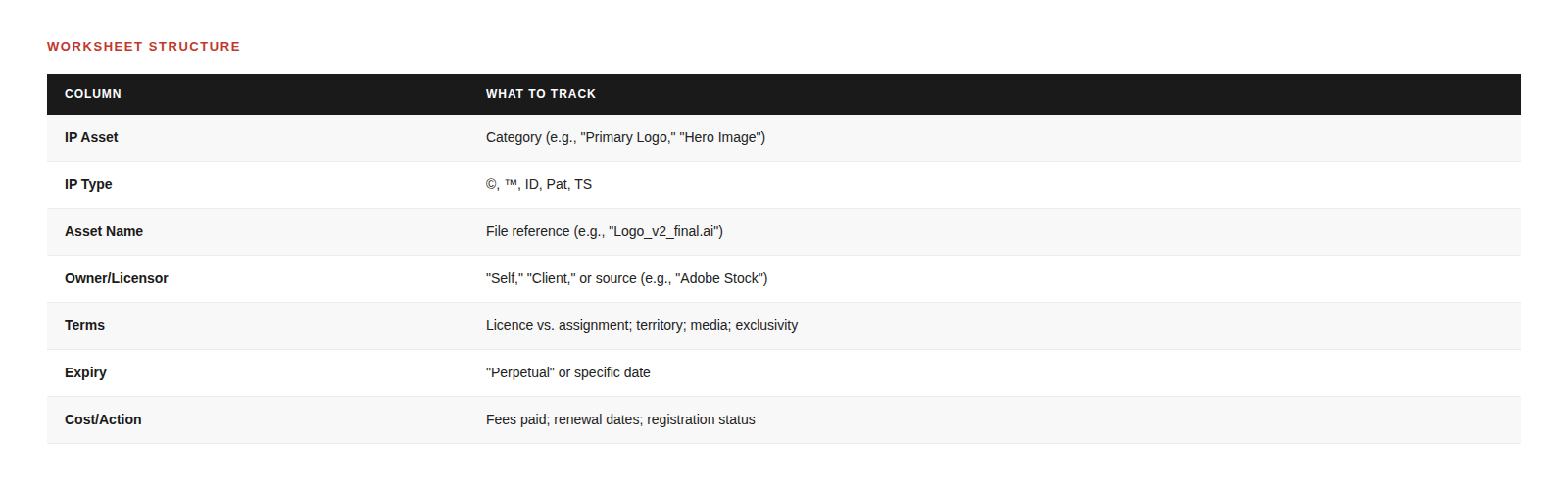
Worksheet structure
Below is a summary of the recommended seven columns for structuring your IP worksheet:
Example row
For a client logo project, a sample worksheet row might include:
- Asset name (e.g., ‘Client Logo’)
- Relevant IP type (such as © Copyright and ™ Trademark)
- Description of the asset (for instance, ‘Custom-designed logo for Client X’)
- Ownership details (specifying whether the designer or client retains rights)
- Licence or assignment terms (indicating whether usage is licensed or fully assigned, along with time, territory and media restrictions)
- Source or creation date
- Current status regarding renewals or expirations
- Additional notes (such as whether a trademark search has been completed or if third-party assets are incorporated)

Asset categories
Group your assets into the following categories. Most projects will involve several of these:
- Brand Identity (™ ©) — Logos, wordmarks, slogans. Search CIPO before finalizing.
- Typography (©) — Licensed fonts. Note scope: desktop, web, app, number of users.
- Photography (©) — Stock and original. Track subscription expiries and obtain model releases.
- Illustrations & Graphics (©) — Include AI-generated work; note tool terms.
- UI/UX Systems (© TS) — Figma files, design systems. Protect with NDAs.
- Video & Motion (©) — Animations, reels. Licences often limit platforms.
- Clearances — Model releases, location permits. No IP type, but essential.
What designers often miss about IP
AI-Generated Content
When using AI tools such as Midjourney, DALL-E or Firefly, review each platform’s terms of service, as ownership rights vary depending on the provider’s policies and the degree of human input involved. Current legal frameworks in many jurisdictions, including Canada and the United States, typically require a human author for copyright protection. Accordingly, works generated entirely by AI, without sufficient human creativity or intervention, may not qualify for copyright registration. Record the prompt, tool version and any substantive human input or post-processing in your IP worksheet. Share this information with your client to ensure transparency regarding AI use in your creative process.
Stock Expirations
When subscriptions expire, some usage rights may also end. Track expiration dates and notify clients if renewal is required for continued use.
Using your worksheet
At the start of a project, list all assets you plan to create and all third-party materials you intend to use. To ensure thoroughness, follow this checklist:
- Identify original and external assets
- Verify ownership and licence status for each
- Flag items needing clearance or additional permissions
- Document any restrictions or required steps before using these materials
As you finalize your creative assets, make sure to update ownership and licence details and keep a record of any AI tools used.
At handoff, review the completed worksheet with your client. Document which rights transfer, which you retain and which third-party licences the client will manage. Highlight renewal dates and client responsibilities.
Audit active projects for expiring licences and trademarks that require renewal on an annual basis.
If you find someone using your work without permission, consult your IP worksheet to confirm your rights or check if they have expired.
To put this guidance into practice, begin by cataloguing all original and third-party assets for each project in an IP worksheet. For each asset, document its ownership, type of intellectual property, licensing or assignment terms and relevant expiration dates or renewals. Use the worksheet to verify that all rights and usage permissions are current and to identify areas needing additional clearance. Regularly update the worksheet as assets are created or licensing terms change. Review and share the completed worksheet with your client during project handoff, highlighting any transfer of rights and upcoming renewal obligations. By following these steps, you can efficiently manage your IP portfolio, accurately set pricing, minimize infringement risks, safeguard your rights and respond promptly to disputes.
Spending twenty minutes documenting each project can save hours of crisis management later and help prevent the loss of rights to your work.
Get the template
If you would like a ready-to-use template or have questions about complex projects or assistance with registration, reach out to Vandana Taxali.
© Vandana Taxali, 2026. All Rights Reserved.
This article is for informational purposes only and does not constitute legal advice. Current as of January 2026. A more detailed version of this article can be found at entcounsel.com.
Resources
Vandana Taxali
Entcounsel and Artcryption
Related Articles







John deWolf RGD, Paddy Harrington RGD, Elia Kanaki RGD, Elana Rudick RGD, Chris Reyes RGD, Carolyn Shaw, Lauralee Sheehan
Sponsored


